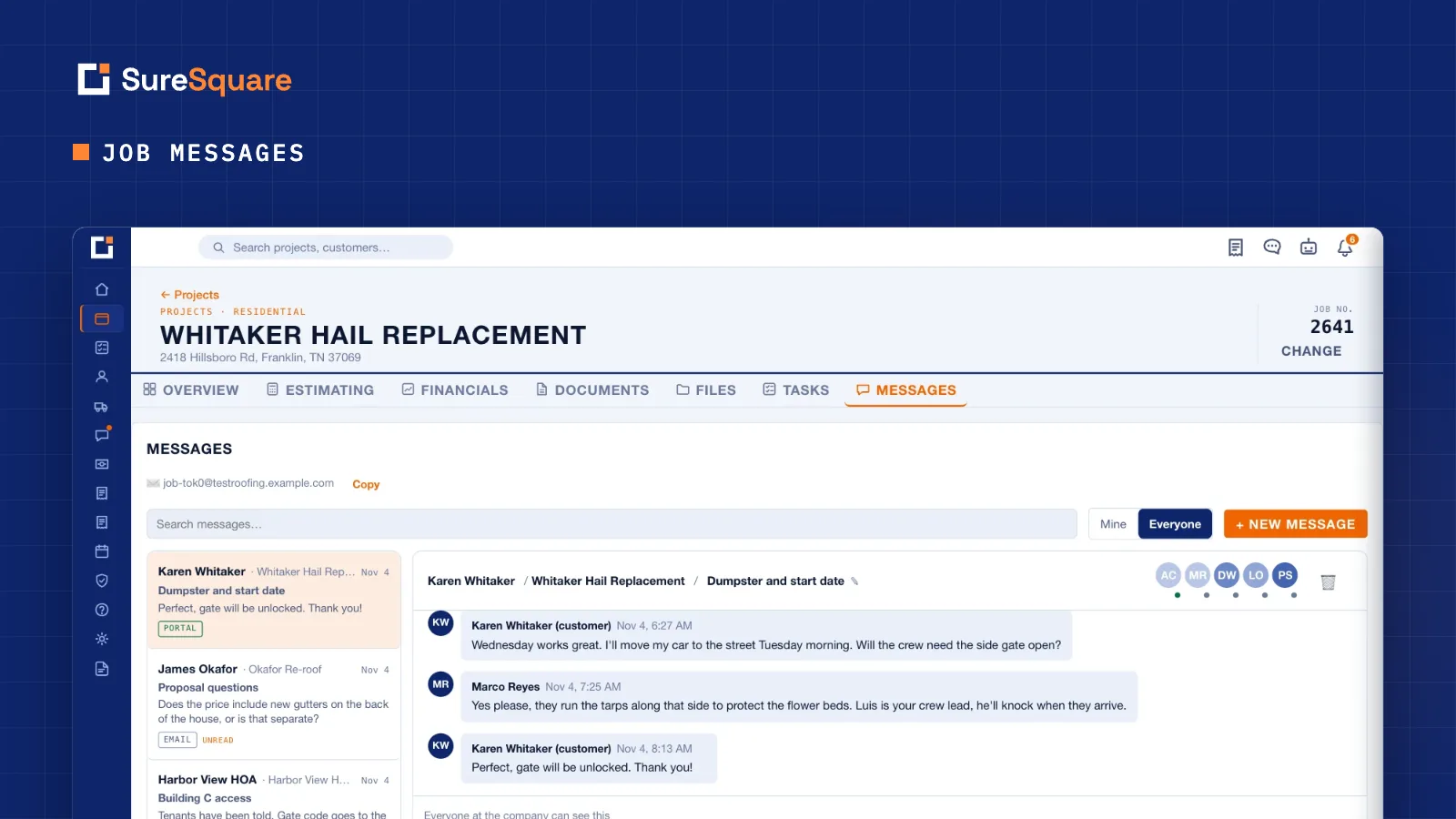
The homeowner texted the sales rep that the dumpster cannot sit on the new driveway. The rep was on a roof in another town, the production manager never saw it, and the dumpster landed on the driveway at 7 a.m. Nobody did bad work. The message just lived on the wrong phone.
Most roofing companies do not have a communication problem. They have a storage problem. The customer said it, somebody on the team heard it, and it never reached the job. This post covers what should be written down on every roofing job, where it should live, and how to set up a simple rule the whole office can follow.
Where roofing job messages actually go
Follow one retail reroof from the first call to the final payment and count the places a message can land:
- The sales rep's personal cell, as texts and voicemail.
- The office inbox, in a thread with the subject line "Re: Re: Roof".
- The owner's inbox, because the customer found that address on the truck.
- A sticky note on the production manager's monitor.
- The crew lead's memory of what the homeowner said in the driveway.
Each of those is fine on the day. The trouble starts three weeks later, when the rep is on vacation, the customer says "I told your guy," and the person holding the phone has no way to check. On an insurance job it gets worse, because the adjuster, the mortgage company and the homeowner are all sending separate messages about the same roof.
What a missed message costs
The cost is rarely the message itself. It is what the crew does without it.
- Return trips. The customer asked for the satellite dish to go back on the south side. The crew put it where it was easiest. Now a two-man crew drives back for a half day.
- Free work. The homeowner agreed by text to pay for four sheets of decking. The text is on a phone that has since been replaced. The office cannot prove it, so the invoice goes out without it.
- Wrong material. The color changed after the proposal was signed. The change went to the rep. The order went out from the original paperwork.
- Slow payment. A customer who feels ignored holds the final check. A lot of late receivables start as an unanswered question about cleanup or a gutter.
- Disputes you cannot win. When a building owner says nobody told them about the wet insulation, the only good answer is a dated message with their reply under it.
None of these show up as a line on the job cost report. They show up as margin that was in the estimate and is not in the bank.
What should be on the job record
You do not need a transcript of every conversation. You need the things that change scope, schedule, money or access. A workable list:
- Access and site notes. Gate codes, dogs, where the dumpster and the material can sit, where the crew can park, which outlet to use.
- Schedule promises. Any date somebody gave the customer, and any time the customer said a date would not work.
- Scope changes. Anything added or removed after signing, even if it is small, with who approved it. Then turn it into a signed document. Our post on getting roofing change orders paid covers that step.
- Color and product choices. Shingle color, drip edge color, vent type, skylight model. Written, not remembered.
- Insurance and mortgage contacts. Claim number, adjuster name, what was approved and when, and who is waiting on which check.
- Complaints and concerns. A nail in the driveway, a cracked paver, a worry about noise. Small today, a bad review later if nobody answers.
- Payment conversations. When the deposit is coming, who is signing the check, any agreed payment date.
If a message touches one of those seven, it belongs on the job where the next person can read it.
Five rules for the office and the field
1. One job, one thread
Pick the place where job conversation lives and make it the job itself, not a person. People change jobs, lose phones and go on vacation. The job record stays. Anyone who opens the job should be able to read what was said without asking around.
2. Phone calls get a two-line note
Calls are where most detail is lost. The rule is short: who you talked to, what was decided, what happens next. Two lines, written right after the call. If it changes money or scope, follow up in writing to the customer the same day so they can confirm it.
3. Use a company number and a company address
When customers text a rep's personal cell, the company owns none of that history. Give customers a business number and a business email, and send from those. It also keeps things steady for the customer when a rep leaves.
4. Answer or acknowledge the same business day
You will not always have the answer. You can always say you got the message and when they will hear back. Most angry calls are from people who asked a fair question and heard nothing for three days.
5. Separate team talk from customer talk
The crew needs to say "decking on the back slope is soft, need a call" without the homeowner reading it first. The customer needs a clean, polite thread without shop talk. Keep both on the job, and keep them apart.
Email, text or portal: which one for what
Each channel is good at one thing. Use them on purpose.
- Text is for short, timely things. "Crew arrives at 7 tomorrow." "Material drops Thursday." "We are wrapped up and the magnet sweep is done."
- Email is for anything with a document or a decision. Proposals, change orders, invoices, insurance paperwork, anything the customer may forward to a spouse, an adjuster or a property manager.
- A customer portal is for the things customers ask about again and again: where the job stands, what they signed, what they owe. If they can look it up, they do not have to call. See what a roofing customer portal should show homeowners for the short list.
- A phone call is for bad news and for anything complicated. Then write the two-line note.
The mistake is not using the wrong channel. It is letting each channel keep its own separate history.
What to look for in software
A spreadsheet and discipline can get a small shop a long way. Past a few jobs a week, it helps when the tool does the filing for you. A short list of what matters:
- Email sent from the job, with the customer's reply landing back on the job and not only in one person's inbox.
- Texting from a business number, with both sides of the conversation saved.
- Team messages on the same job, kept apart from what the customer sees.
- A customer portal where the homeowner can read messages, documents and progress.
- Notifications each person can set, so the right people hear about a new message and the rest are not buried.
- Permissions by role, so crews see the scope and schedule without seeing what the job makes.
SureSquare CRM keeps job conversation on the job record. There is two-way email on every job: you send from the job, the customer replies from their own inbox, and the reply lands on the job. It also has messaging with your team and your customers, calls from your browser with two-way texting, and a customer portal with documents, selections, messages and progress. Notifications go out in the app and by email, with settings per user.
A ten-minute audit you can run today
Pick three jobs you finished last month. For each one, try to answer these from the job record alone, without calling anybody:
- What date did we tell the customer we would start?
- Did the scope change after signing, and who approved it?
- What color did they pick, and where is that written?
- Did the customer raise a concern, and how was it answered?
- When did we last contact them about the balance?
If you can answer all five on all three jobs, your process works. If you have to text a rep to find out, that is the gap, and it is the same gap your customers feel.
Closing
Good communication on a roofing job is less about talking more and more about keeping what was said where the whole team can find it. One thread per job, a note after every call, and a same-day reply cover most of it. If you want the email, texts, team messages and customer portal tied to the job for you, take a look at SureSquare CRM. It is $149 a month plus $18 per user, billed annually, and the details are on the pricing page.